


Do you sometimes struggle to keep track of how a project is progressing? Or, do you wish you had a simple technique for managing your resources, and for identifying bottlenecks in your processes?
If you do, then a Kanban board could be just what you need. It allows you to see at a glance how a project's tasks are progressing, and helps you and your team manage them through a disciplined workflow. What's more, the only things you need to create a Kanban board are a whiteboard, pens and some colored sticky notes!
In this article, we'll look at how to create and use a Kanban board, and we'll see how it can make your workflow more efficient.
What Is Kanban?
The concept of Kanban dates back to the 1940s. It was the brainchild of Japanese industrial engineer Taiichi Ohno. He worked for the car manufacturer Toyota, and he wanted to improve the company's inventory control systems. Ohno developed Kanban, loosely translated as "visual signal," as an easy-to-follow system for managing and smoothing out workflow.
A major use of Kanban is to manage the efficient flow of resources through a supply chain. However, you can also use it to manage how a project is progressing, and that's what we're looking at here.
How a Kanban Board Works
Access the essential membership for Modern Managers
The simplest version of a Kanban board uses a whiteboard and color-coded sticky notes to signify different levels of urgency or priority, or to differentiate types of work or task. There are also many apps and software packages available that allow you to create digital Kanban boards and share them with your team.
This simple version of the board is divided into three sections signifying, from left to right, Work To Do, Work Being Done, and Work Completed.

The actual wording can vary, and the board can have a column for every step in your production process. Whatever the wording, the point is that the board represents a flow, and your team members move the sticky notes or labels from one section of it to the next, as they start work on a task and take it through to completion.
Kanban Boards in Practice
The best way to get a feel for how a Kanban board works is to experiment with one. But let's imagine how one might work in practice:
You're running a software development team and you're managing the delivery of a new content management system for a publishing company. So you use a whiteboard to set up your Kanban board.
Access the essential membership for Modern Managers
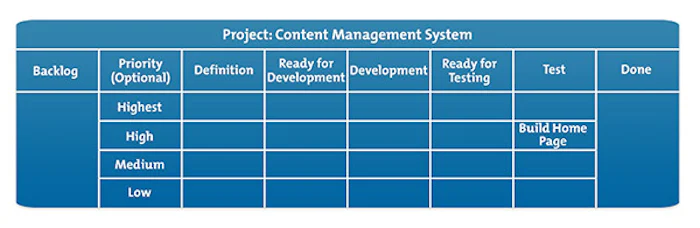
You divide your board into vertical columns, each representing a stage that tasks will go through during your project. For example:
- Backlog: this is your list of to-do items at the beginning of the project.
- Definition: this is the planning stage for each task.
- Ready for Development: tasks in this column have been through planning and can be picked up by a developer.
- Development: tasks in this column are being worked on by the developers.
- Ready for Testing: this is a holding column, for tasks that are between the development and testing stages.
- Test: your product is undergoing testing and quality assurance.
- Done: your task is complete with no further action required.
Note:
A Kanban board can also be subdivided into horizontal sections, known as "swim lanes." For example, the board could be split horizontally into different levels of priority: highest, high, medium, and low.
Let's look at how you and your people can use this Kanban board.
In the Backlog column, you have the list of tasks that need to be done. These to-do items are represented by a visual marker, such as a sticky note. They can be color-coded to represent the type of task, or its urgency.

In our example project, one of the tasks in the backlog column is Build Home Page. The project manager takes the marker for that task and moves it along the board into the Definition section. It is now ready to be worked on by a user experience (UX) designer.
Access the essential membership for Modern Managers

When the UX designer has completed their work, they move the marker to the Ready for Development column, where it can be picked up by a developer, who moves it into Development.

When the developer has completed their work on the home page, they move the marker to the Ready for Testing column, which denotes that the software is ready for quality assurance and product testing. It is then picked up by the QA team and placed in the Test column.
After testing, if the software is deemed to be fully operational and can be delivered to the client, the marker can be moved by the tester into the Done column. But if the testing procedure reveals any problems, the marker can be moved back to Ready for Development for the developer to have another look at it, but with an identifier to show it has come back from the testers.

Access the essential membership for Modern Managers
Note 1:
Our example uses a simple, one-team-member-per-task model, but what happens if more than one person works on a task at a particular stage? For example, there may be multiple developers involved in a single task. In such cases, they take responsibility as a team for the task, while the project manager "polices" the Kanban board and regularly reviews each stage.
Note 2:
What if there are multiple tasks in a column, and multiple people working separately at that stage? For example, there may be three tasks in the Test column and four testers working on the project. How would a tester know if a task was already being worked on? In such cases, a tester who picked up a task can initial the marker to let his colleagues know that he has the task in hand. But that confusion can be avoided by adding holding columns such as Ready for Development or Ready for Testing, as in our example.
Tip:
Kanban boards often have a number at the top of each column showing the maximum number of markers you can have in that column.
If there are more markers in the column than the number shown, it is a clear, visual sign that there is a blockage that needs to be addressed. This can help you to identify where to shift resources to, or whether to change your priorities. Often, when a bottleneck is identified, teams will "swarm" to work on the build-up of markers to remove the blockage.
Key Points
A Kanban board is a simple visual tool that helps you to manage the flow of project tasks through a disciplined project process.
It can be a wallchart, a whiteboard, or an app. Team members use a system of colored counters, markers or sticky notes to show the progress and urgency of a task, job or project.
Your Kanban board can highlight bottlenecks or blockages that develop in your workflow, which allows you to continuously improve your processes and your team management.
Apply This to Your Life
Try using a Kanban board to manage a small project. As a visual tool, a simple version with columns marked To Do, In Progress, and Done may complement an action plan to help you keep track of your workflow.
Share this post
Discover more content

Estimating Time to Complete
Failing to deliver a project on time means stress and a loss of credibility. Estimate completion time accurately with this four-step process.

Gap Analysis
Use Gap Analysis to identify where you want to be and where you are now, and set clear tasks and objectives that will help you to achieve success.

The MoSCoW Method
This simple prioritization approach can help your team and key stakeholders reach consensus on which tasks are most important to the success of a project.